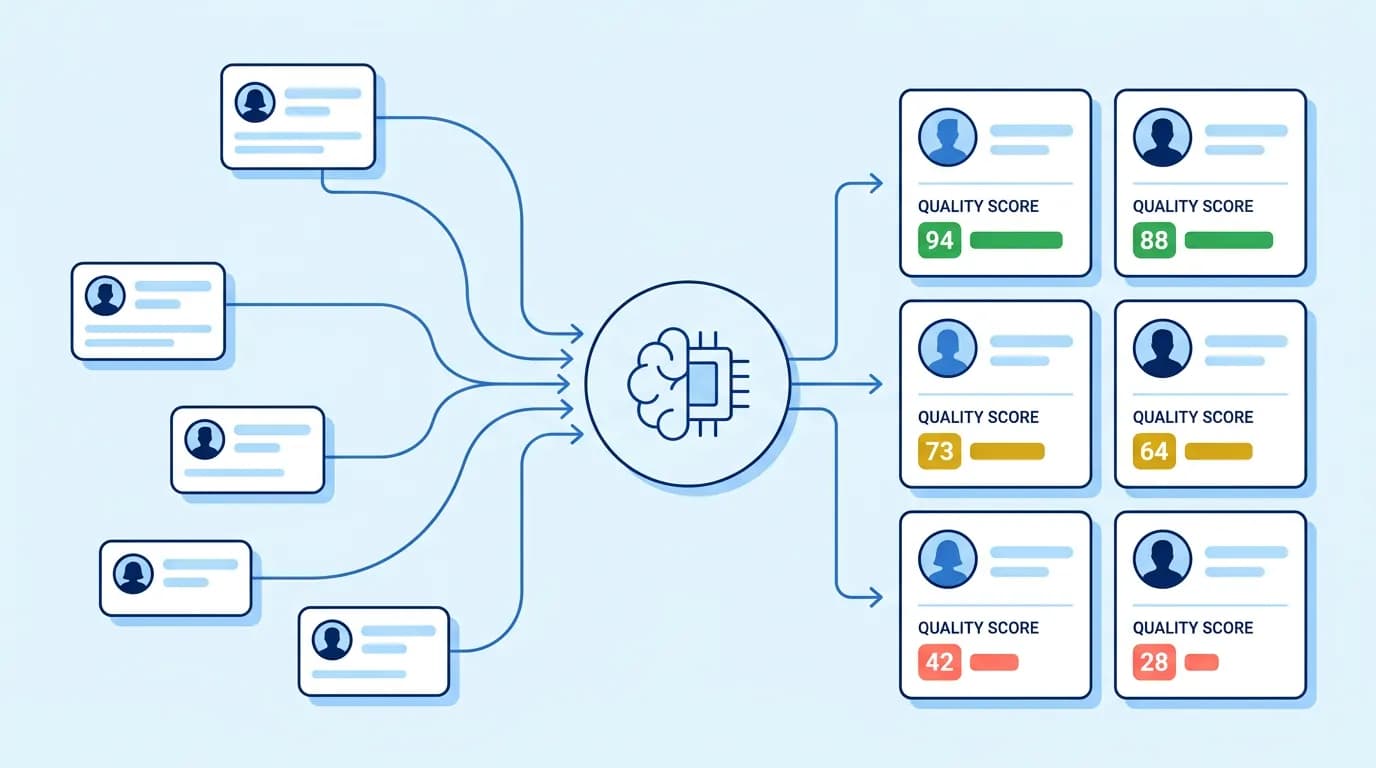
Manually reading every form, email, and chat message to decide who deserves a follow-up doesn’t scale well. Automated lead qualification lets AI evaluate each lead against your criteria in seconds, so your team can focus on the right conversations.
Why do you need automatic lead qualification
Reviewing leads by hand takes time, and the delay costs deals. A prospect who fills out a form expects a fast response, and every hour of silence increases the chance they move to a competitor.
Automated lead qualification removes that bottleneck by evaluating each lead the moment it arrives, applying the same criteria consistently, and routing it to the right next step without a person having to check every record first.
How specifically automated lead qualification helps
This kind of automation typically saves time and money in several concrete ways:
It removes repetitive manual review, so reps spend time on selling instead of sorting.
It applies scoring rules consistently, avoiding the bias or fatigue that comes with manual review.
It responds within minutes instead of hours, which increases the chance of engagement.
It reduces wasted outreach on leads that were never going to convert.
It keeps CRM records updated automatically, so nothing falls through the cracks.
How to complete a successful lead qualification
Automated lead qualification works only when the underlying process is clear. A practical sequence looks like this:
Define your target audience and ideal customer profile (ICP).
Decide which channels will feed leads into the workflow: forms, email, chat, or social platforms.
Collect and normalize lead data into one consistent format.
Enrich the record with firmographic or behavioral signals where available.
Score the lead against your criteria.
Classify the lead into a tier, such as hot, warm, or cold.
Route the lead to the right action: sales alert, nurture sequence, or review queue.
Update your CRM and log the outcome for future refinement.
What do you need for efficient automated lead qualification
Before building an automation, you need clearly defined lead qualification criteria and a workflow that reflects how your team actually makes decisions. Automation only works well when the rules behind it are already solid.
Automated lead qualification depends on a specific ICP, not a vague description. Include industry, company size, region, job title, and the core problem your product solves. Vague criteria lead to inconsistent AI scoring, since the model has nothing precise to compare against.
Clearly define and polish your workflow
Map out every step before adding AI: where leads originate, what data gets collected, how scoring happens, and who receives the output. A workflow with unclear branching or missing steps will produce inconsistent qualification results, regardless of how good the AI model is.
Clearly define the output format
Decide exactly what a completed qualification result should contain: score, tier, reasoning, missing information, and recommended action. A structured, predictable output format lets your CRM, Slack, or email tools act on the result automatically, instead of requiring a person to interpret free-text AI responses.
How does AI assist in lead qualification
AI assists lead qualification by reading unstructured lead data, comparing it against your ICP and scoring criteria, and returning a structured result: a score, a classification, and the reasoning behind it.
Platforms such as HubSpot and Salesforce already use AI models like Breeze Intelligence and Einstein Lead Scoring to analyze historical conversion patterns and automatically prioritize leads. The same logic can run as a custom workflow using your own scoring rules and a model of your choice.
Example of a good prompt for lead qualification automation
A strong prompt for automated lead qualification with AI should pass in both the raw lead data and your defined criteria, then require structured output:
You are an automated lead qualification assistant.

Target audience: <YOUR TARGET AUDIENCE HERE>
Qualification criteria: <YOUR LEAD CRITERIA HERE>
Lead data: <LEAD DATA HERE>

Evaluate this lead using only the supplied data.
Do not make assumptions about missing information.

Return valid JSON with:
- score (0-100)
- tier (hot, warm, cold)
- fit_reasoning
- missing_information
- recommended_next_action
This structure keeps automated lead qualification with AI reliable, because the model is answering a narrow, defined question instead of producing an open-ended judgment.
Automate lead qualification with AI: Step-by-step with ScriptRun
Once your criteria and workflow are ready, ScriptRun can run the automated lead qualification process end to end using AI agents:
A new lead triggers the workflow through a webhook or scheduled run.
An AI agent node receives the lead data along with your qualification criteria.
ScriptRun sends requests to your chosen model via its OpenAI-compatible API, providing access to 50+ models through a single Base URL and key.
The agent returns a structured qualification result: score, tier, reasoning, and next action.
Conditional routing sends hot leads to sales notifications, warm leads to nurture sequences, and unclear leads to a review queue.
The Workflow API updates your CRM record and logs the result, with real-time status tracking available throughout the run.
Because the workflow runs through an agent rather than a fixed script, it can adapt to slightly different lead formats without a full rebuild each time a new lead source is added.
Automated lead qualification turns a slow, manual review process into a fast, consistent workflow. With clear criteria, a defined output format, and ScriptRun’s AI agents and API access, your team can qualify every lead automatically and act on the results immediately.
Helpful?
Share this article!
Build AI workflows in minutes
Create automations, connect APIs, and access 50+ AI models from a single platform.
Create automations, connect APIs, and access 50+ AI models from a single platform.
Visual workflow builder
OpenAI-compatible API
Workflow marketplace & templates
Start free, plans from $5
FAQ about automated lead qualification
What is automated lead qualification?
Automated lead qualification is the process of using software and AI to evaluate incoming leads against defined criteria automatically, without manual review, and route them to the right next action.
How does AI assist in lead qualification in Salesforce?
Salesforce uses Einstein Lead Scoring, which analyzes historical conversion patterns and lead field data to build a predictive scoring model, helping sales teams prioritize leads without manual analysis.
How does HubSpot CRM automate lead qualification?
HubSpot combines AI-assisted fit and engagement scoring, Breeze enrichment, and workflow automation to score, route, and update lead records automatically as new activity or data arrives.
What makes an automated lead qualification bot effective?
An effective bot needs a clearly defined ICP, structured scoring criteria, a consistent output format, and a review path for uncertain cases, so results stay accurate and explainable.
Can lead generation services be combined with automated qualification?
Yes. Leads sourced from lead generation services can flow directly into an automated qualification workflow, which scores and routes them the same way as leads from forms or CRM entries.
Is AI lead qualification automation reliable without human review?
AI lead qualification automation works best with a human-review step for ambiguous, high-value, or incomplete records, since automation should support decisions, not replace judgment entirely.
How do I start lead qualification automation with ScriptRun?
Define your ICP and scoring criteria, build a webhook-triggered workflow, connect an AI agent through ScriptRun’s API, and configure routing so qualified leads reach your CRM and sales team automatically.
Learn how to measure API latency, benchmark DeepL requests, investigate Discord delays, and improve AI API performance. Set realistic targets and test changes without overlooking reliability, output quality, or cost.
Is ChatGPT General Purpose Technology? Explore the evidence, what it means for businesses, and how ScriptRun helps turn AI capabilities into repeatable processes.
Compare 8 AI coding assistants by job, not hype: current 2026 pricing, agent features, privacy options and the limits vendors leave out of their pages.


 Alister