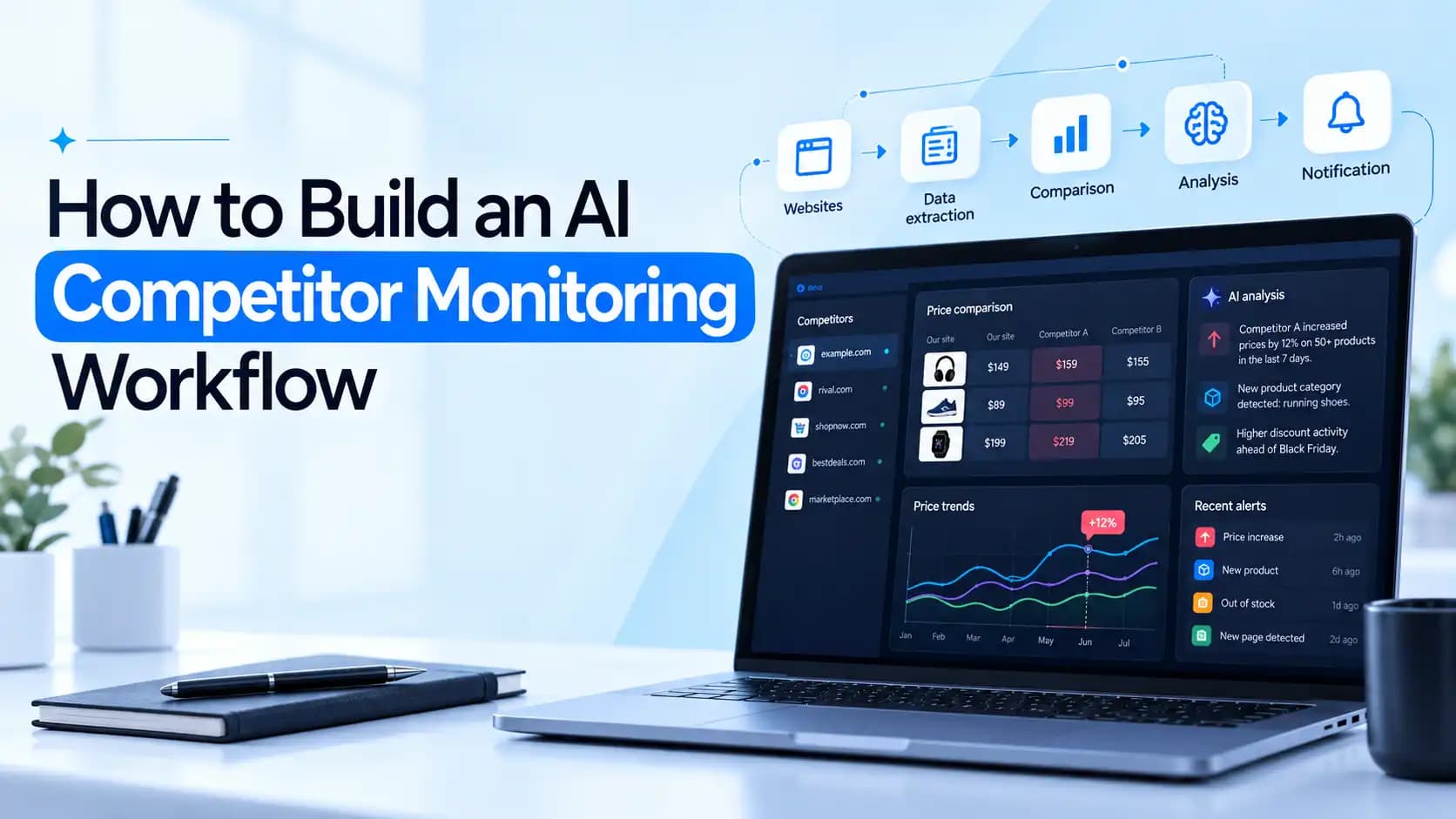
Your competitor just dropped prices by 20%, and you found out three days late – from a customer. If you're tracking these changes manually, you might not notice what changed until it's too late, costing you deals and leading to lost opportunities.
An AI competitor monitoring workflow can catch changes like this automatically, compare them with previous data, and alert your team before you miss another market move. In this guide, you'll learn how to build one with ScriptRun, automate competitor website monitoring, and use AI competitor analysis to turn raw updates into actionable insights.
What is AI competitor monitoring
AI competitor monitoring is the practice of using AI to continuously watch competitor websites, pricing pages, and product updates. Unlike traditional competitor analysis, which relies on occasional manual research, automated monitoring detects changes as they happen — and AI goes a step further by summarizing their implications instead of just flagging a couple of differences.
For example, if a competitor raises prices, removes a feature, or launches a new plan, AI monitoring catches it immediately and suggests how to act on them, rather than leaving you to figure it out yourself.
What should your competitor monitoring workflow track
A good monitoring workflow tracks what actually drives decisions, not everything a competitor publishes. Organize your targets by the business decision they inform:
Pricing pages: plan prices, usage limits, and discounts, so you know when you're being undercut or when there's room to raise prices.
Product pages and changelogs: feature launches and removals to spot gaps in your own roadmap.
Landing pages: positioning, messaging, and new offers — so you understand how they're pitching to the same audience.
Public announcements: launches, partnerships, and market moves to stay aware of any strategic shift.
Each URL also needs its own check frequency. Pricing pages may warrant daily checks, while changelogs can run weekly without losing anything important.
The pipeline comes down to four technical capabilities working together: discovery, extraction, monitoring, and enrichment.
Start with a focused watchlist. Pick 3 to 5 competitors and the pages that actually drive decisions, such as pricing, product, or positioning. Trying to monitor everything at once is the fastest way to build a system nobody trusts.
The hard part isn't fetching pages — it's extracting structured data from them. Competitor pricing tables load asynchronously, changelogs live on JavaScript-rendered SPAs, and announcements are buried in blog posts. Use an official API where one exists; otherwise, HTTP requests or browser automation. You need clean text, not raw HTML.
Noise filtering separates useful monitoring from alert fatigue. Strip navigation, timestamps, and rotating banners before comparing versions, and deduplicate events so the same announcement doesn't trigger five alerts. Pricing pages may need daily checks; changelogs can run weekly.
The LLM's job is classification with evidence. Provide both versions and require structured output: change type, old value, new value, evidence, and business impact. Every field needs a source citation and confidence score.
Deliver alerts where your team already works — Slack, email, or a database. scriptRun's workflow API supports webhooks on execution events, so downstream actions fire the moment a change is detected.
Example*: A pricing page changes from $49 to $59. Instead of sending the entire HTML page to the LLM, the workflow detects the numeric diff and flags a 20% price increase, with the old value, new value, and the exact line as evidence. The alert your team receives is one clear sentence, not a wall of markup.*
How to build this workflow with ScriptRun
scriptRun is an AI workflow builder that lets you chain nodes for LLMs, API calls, and logic, triggered manually, via API, or on a schedule. Here's how the competitor monitoring pipeline maps to it.
1. Set up the trigger and schedule
Use the Trigger Node to start your workflow. Schedule it to run daily or hourly depending on the page. You can also trigger via API with input data for manual runs.
2. Fetch competitor pages
Add an HTTP Node to pull page content. scriptRun's visual editor supports API calls and conditions, so you can handle different page types in one flow. Where an official API exists, use it; otherwise, HTTP requests work for static pages.
3. Clean and compare snapshots
Use logic nodes to strip navigation and timestamps, then compare against the stored previous version. scriptRun supports branches and conditional logic for this kind of processing.
4. Classify changes with an LLM
Add an LLM node and send both versions with a structured prompt. scriptRun provides access to GPT, Claude, Llama, and Mistral through one interface, no separate API keys needed. Require output with change type, old value, new value, evidence, and business impact.
5. Send alerts
Use the HTTP Node to post to Slack, send email, or write to a database. scriptRun's workflow API supports real-time status tracking and webhooks on events (start/success/error/steps).
Why scriptRun fits this use case: The platform is designed for AI scenarios integrated into business workflows, with model routing handled automatically. You build the logic visually, then run it via API without managing separate LLM provider accounts.
How to use AI to turn competitor changes into insights
Detection is only half the job. Once your workflow flags a change, the LLM should:
Classify the change — pricing shift, feature launch, messaging update, or new offer.
Summarize what changed — in one clear sentence, not a raw diff.
Explain why it may matter — what it signals about their strategy or your positioning.
Compare it with your offering or past competitor behavior — is this new, or a pattern?
Assign a confidence level and link to source evidence — so your team can verify the reasoning.
A structured sample output might look like:
text

{

  "change": "Pricing page: Plus tier increased from $49 to $59",

  "evidence": "pricing page, line 12: 'Plus — $59/month'",

  "business_impact": "20% price increase; may signal margin pressure or premium repositioning",

  "confidence": 0.92

}
⚠️ Warning: never let the model infer changes that aren't supported by the page snapshots. If the evidence isn't in the diff, it shouldn't be in the output.
Helpful?
Share this article!
Build AI workflows in minutes
Create automations, connect APIs, and access 50+ AI models from a single platform.
Create automations, connect APIs, and access 50+ AI models from a single platform.
Visual workflow builder
OpenAI-compatible API
Workflow marketplace & templates
Start free, plans from $5
Frequently Asked Questions
Can AI monitor competitor websites automatically?
Yes, an AI competitor monitoring workflow can collect website data on a schedule, compare it with previous snapshots, use an LLM to analyze meaningful changes, and send automated alerts to your team.
How often should you monitor competitors?
Check competitor pricing pages daily or more frequently when prices change rapidly, while weekly checks may suffice for changelogs and less volatile product pages.
Can AI detect competitor pricing changes?
Yes, AI can interpret competitor pricing changes, but reliable detection starts with structured price extraction or content comparison to identify differences between current and previous prices.
Can you build competitor monitoring without coding?
Yes, a visual AI workflow builder like ScriptRun can connect data collection, LLM analysis, conditional logic, and notifications, although external services may be needed for browser automation, persistent storage, or scheduling.
Learn how to measure API latency, benchmark DeepL requests, investigate Discord delays, and improve AI API performance. Set realistic targets and test changes without overlooking reliability, output quality, or cost.
Is ChatGPT General Purpose Technology? Explore the evidence, what it means for businesses, and how ScriptRun helps turn AI capabilities into repeatable processes.
Compare 8 AI coding assistants by job, not hype: current 2026 pricing, agent features, privacy options and the limits vendors leave out of their pages.


 Debrah