

LLM Router: How Model Routing Works and When Your App Needs One
 Anna
Table of contents:
Quick Answer: An LLM router sits between your app and your model providers and chooses which model answers each request. Simple prompts go to fast, cheap models, hard ones go to stronger models, and failed calls go to a backup provider. You need one when you use several models, hit outages or rate limits, or want to cut costs.
-
Main strategies: rule-based, semantic, cost/complexity-based, learned (e.g. RouteLLM) and fallback routing.
-
Start simple: fallback plus a few rules covers most apps. Add smarter routing when your data shows a gain.
-
Trade-offs: a little added latency, one more dependency, and data passing through a third party.
-
Measure it: cost per 1,000 requests, p95 latency, fallback rate and quality spot-checks.
-
Fastest setup: an OpenAI-compatible API. Change the base URL and key, and keep your code.
Most teams start with one model for everything. It works until the bill grows, a provider has an outage, or you notice that "What are your opening hours?" is going to the same expensive model as "Review this 40-page contract."
No single model is the best choice for every request on cost, speed and quality at once.
This guide explains what an LLM router does, how routing decisions are made, the main strategies, what a router costs you, and how to tell whether your app needs one yet.
What is an LLM router
An LLM router is software that sits between your application and one or more model providers. Your app sends a request to the router once, and the router chooses which model and which provider should answer it. Your code no longer hard-codes "always call model X."
The core function of an LLM router comes down to four jobs:
-
Model selection. Pick the model that fits the request: a small, fast model for a short classification, a strong reasoning model for multi-step analysis, a long-context model for a large document.
-
Fallback and failover. When a provider returns an error, hits a rate limit or slows down, retry or send the request somewhere else instead of failing the user.
-
Load balancing. Spread traffic across keys, regions or providers so no single quota becomes the bottleneck.
-
Cost control. Keep expensive models for the requests that actually need them.
Some teams call this an AI model router or a model router.
💡 The idea is the same: the decision about which model to use moves out of your application code and into one place you can change.
LLM router vs LLM gateway
The two terms overlap, and many products do both. The simplest way to separate them: a router decides where a request goes; a gateway manages everything around the request.
| LLM router | LLM gateway | |
|---|---|---|
| Main question it answers | Which model should handle this request? | How do all requests reach providers safely and consistently? |
| Typical features | Model selection, routing rules, fallback, load balancing | One API for many providers, API keys, quotas, rate limits, logging, billing |
| Can exist without the other? | Yes, as a few lines of code in your app | Yes, as a proxy that only forwards requests |
| In practice | Usually one feature inside a gateway | Usually includes routing |
If you're comparing products, look at both halves. A router with smart rules but no failover, logging or spend limits still leaves you building the rest yourself.
How LLM routing works
LLM routing is the decision process a router runs on every request. Implementations differ, but most follow the same six steps:
-
The request arrives. Your app sends a prompt to one endpoint, often in the OpenAI request format, with optional hints such as a task name, a user tier or a maximum cost.
-
The router classifies it. It reads the signals it has: prompt length, task type, keywords, an embedding of the prompt, or a score from a small trained model that estimates how hard the request is.
-
It picks a target. Based on that classification and your rules, it selects a model and a provider, for example a small model for a short FAQ answer or a frontier model for a coding task.
-
It calls the provider. The request is translated into that provider's format if needed and sent.
-
It handles failure. If the call returns a server error, a 429 rate-limit error or takes too long, the router retries with backoff or moves to the next model on a fallback list.
-
It records the result. Model used, tokens, cost and latency are logged, so you can see whether your routing rules are doing what you expect.
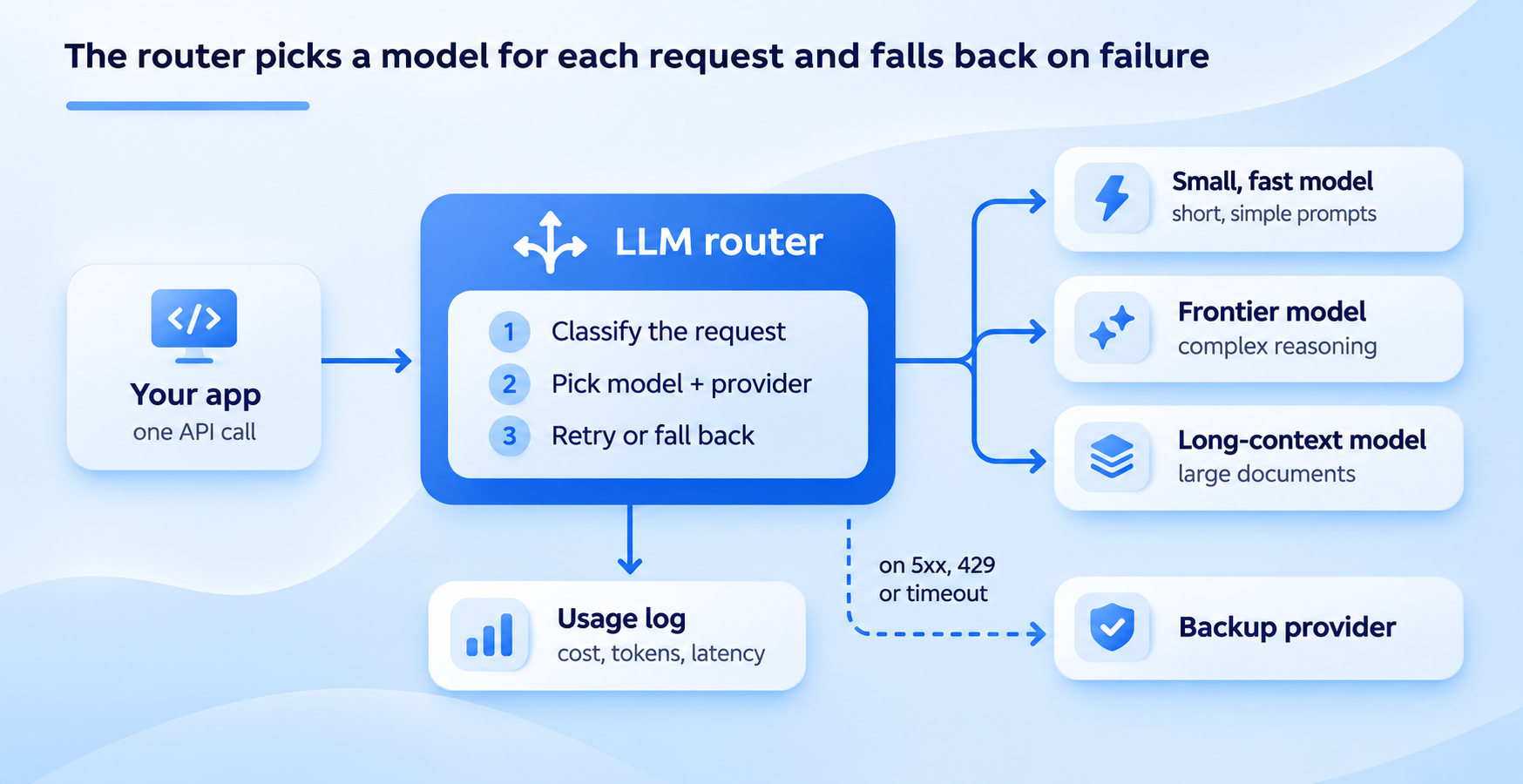
One request goes in; the router chooses the model, switches to a backup when a call fails, and logs what each request cost.
Your application only sees steps 1 and 6: one request in, one response out. That separation is the main reason teams adopt model routing.
You can change models, add providers or tighten cost rules without shipping new application code.
LLM routing strategies
There are five common ways a router decides where a request goes. Most production setups combine two or three: simple rules for the obvious cases, a smarter method for the rest, and fallback underneath everything.
| Strategy | How it decides | Best for | Main drawback |
|---|---|---|---|
| Rule-based | Fixed conditions: task name, user tier, prompt length | Clear, predictable workloads | Rules grow messy and miss edge cases |
| Semantic | Compares the prompt's embedding to example prompts for each route | Mixed traffic with recognizable intents | Needs good examples and a tuned similarity threshold |
| Cost / complexity | Estimates difficulty, sends easy prompts to cheaper models | Cutting spend on high-volume apps | A wrong estimate sends a hard prompt to a weak model |
| Learned | A trained classifier predicts which model will answer well enough | Large volumes with quality data to train on | Training data, evaluation and drift monitoring |
| Fallback / load balancing | Order of preference plus health checks, quotas and latency | Uptime and rate-limit protection | Doesn't choose by quality, only by availability |
Rule-based routing
The simplest LLM routing technique:
✅ If the task is "summarize_ticket", use model A;
✅ If the user is on the free plan, use model B;
✅ If the prompt is over 50,000 tokens, use a long-context model.
Rules are fast, cheap to run and easy to debug. Start here. Most apps get a large share of the benefit from a handful of rules.
Semantic routing
The router turns each incoming prompt into an embedding and compares it with example prompts for each route.
"What's my balance?" and "How much money do I have?" land on the same route even though they share no keywords.
Semantic routing works well for chatbots and support assistants where users phrase the same intent many ways.
You need a set of examples per route and a similarity threshold, plus a default route for prompts that match nothing.
Cost and complexity-based routing
Here the router estimates how hard a request is and sends it to the cheapest model likely to handle it.
Greetings, classifications and short factual answers go to a small model; multi-step reasoning, code and long analysis go to a frontier model.
This is the strategy behind most "cut your LLM bill" claims, because in many apps the majority of requests are simple.
Learned routing (RouteLLM)
Learned routers train a small model to predict, for each prompt, whether a cheaper model will answer well enough. The best-known open-source example is RouteLLM from LMSYS, which trained four router types, including a matrix factorization model and a BERT classifier.
Routing between GPT-4 Turbo and Mixtral 8x7B, LMSYS reported cost reductions of over 85% on MT Bench, 45% on MMLU and 35% on GSM8K while keeping 95% of GPT-4's performance.
Those are benchmark results from 2024 models, so treat them as evidence the approach works, not as a forecast for your traffic.
Fallback and load-balancing routing
This strategy doesn't judge the prompt at all. It keeps a preferred order of models or providers and moves down the list when a call fails: a 5xx error, a 429 rate-limit response, a timeout or a stream that drops mid-answer.
Load balancing spreads requests across several keys or providers so no single quota runs out. It's the least clever strategy and often the most valuable, because it keeps your app answering during an outage.
If you regularly hit 429s, see our guide to OpenAI API rate limits.
Do you need an LLM router
Not every app does. A router pays off when you have choices to make between models, or failures to absorb. If you tick two or more of these, it's worth setting one up:
-
You already call two or more models or providers, or plan to.
-
You've hit rate limits, 429 errors or provider outages in production.
-
Your traffic mixes simple requests (FAQs, tagging, short replies) with hard ones (reasoning, code, long documents).
-
Model spend is a line item someone asks about every month.
-
You want to test a new model on part of your traffic without a code release.
-
You're tired of managing separate keys, SDKs and invoices for each provider.
You can probably wait if you use one model, your volume is low, outages wouldn't hurt anyone, and the bill isn't a concern.
In that case, a single provider SDK is simpler, and adding a router early just adds a moving part.
Revisit the question when any of the conditions above changes.
There's also a middle path. Pointing your app at an OpenAI-compatible endpoint that supports many models costs you almost nothing today, because you keep the same SDK.
When you do need routing or failover later, it's a configuration change rather than a migration.
What an LLM router costs you
A router solves real problems, but it isn't free. Most vendor pages skip this part, so here it is plainly.
-
Added latency. Every request takes an extra hop, and some strategies add work before the call: computing an embedding or running a classifier. Rule-based routing adds very little; learned and semantic routing add more. Vendors quote very different overhead figures, so measure it yourself with your own prompts and region. For background on what drives response time, see our guide to API latency.
-
Another dependency. If the router goes down, everything behind it goes down too. Check its uptime record, status page and what happens to in-flight requests during an incident.
-
Data passing through a third party. With a hosted router, your prompts and responses pass through one more company. Read its data retention policy and check where data is processed, especially for regulated data.
-
Misroutes. A complexity estimate will sometimes send a hard prompt to a weak model. Users notice a bad answer more than a slow one, so start conservative and loosen the rules as you gain data.
-
Inconsistent outputs. Different models format answers differently. If your app parses JSON or expects a fixed structure, use structured outputs or validate responses, whichever model answered.
How to measure whether routing works
A router you can't measure is just a guess with extra steps. Before you turn it on, record a baseline from your current setup, then compare the same numbers after.
| Metric | What it tells you | Watch for |
|---|---|---|
| Cost per 1,000 requests | Whether routing is saving money | Savings that come with a quality drop |
| p95 latency | The slow-tail experience users actually feel | Router overhead or slow fallback models |
| Share of traffic per model | Whether the rules behave as intended | Almost everything still going to the expensive model |
| Fallback rate | How often the primary choice fails | A rising rate means a provider or quota problem |
| Quality spot-checks | Whether cheaper models answer well enough | Lower ratings or more retries on routed requests |
For quality, sample a few dozen routed requests each week and review them, or run them through the strong model as well and compare.
Thumbs-up rates, retry rates and support tickets are useful signals too.
Roll out in steps. Begin with fallback only, add two or three simple rules, and move to semantic or learned routing only when your numbers show where the remaining savings are.
Types of LLM routers
When people search for the best LLM router, they're usually choosing between four kinds of solutions. The right one depends on how much you want to build and run yourself.
| Type | Examples | You get | You take on |
|---|---|---|---|
| Build your own | A few rules in your code | Full control, no extra vendor | Every provider SDK, retries, logging and keys |
| Open-source router | LiteLLM, RouteLLM, NVIDIA LLM Router | Ready-made routing logic you can self-host | Hosting, scaling, upgrades and monitoring |
| Hosted gateway | OpenRouter, Portkey, Azure AI Foundry model router | Many models behind one API, no servers to run | A vendor in your request path |
| OpenAI-compatible API with routing | ScriptRun | Routing, failover and one bill without changing your SDK | A vendor in your request path |
Building your own makes sense for one or two models and simple rules.
Open source suits teams with infrastructure experience and strict data requirements.
A hosted option suits teams that want routing working this week rather than this quarter.
For a side-by-side look at hosted options, see our comparison of OpenRouter alternatives.
Routing with an OpenAI-compatible API
The fastest way to add routing to an existing app is to keep the SDK you already use and change where it points.
Because most models can now be reached through the OpenAI request format, an OpenAI-compatible API lets you switch or route between models without rewriting your integration.
ScriptRun's OpenAI-compatible API works this way. You keep the OpenAI SDK, change the base_url and the key, and get:
-
Multiple model providers behind one interface, with no separate accounts or KYC for each provider
-
Smart routing that picks a model by quality, cost and context size
-
Automatic failover between providers during outages
-
Retries with backoff and request-level idempotency, so a retried call isn't processed twice
-
Per-project keys, limits and quotas, plus a single bill
Here's what the change looks like in Python:
from openai import OpenAI

client = OpenAI(
    base_url="SCRIPTRUN_BASE_URL",   # from your ScriptRun dashboard
    api_key="YOUR_SCRIPTRUN_KEY",
)

response = client.chat.completions.create(
    model="MODEL_ID",               # any model available in ScriptRun
    messages=[{"role": "user", "content": "Summarize this support ticket in two lines."}],
)
print(response.choices[0].message.content)
The rest of your code, including streaming, tools and embeddings, stays the same.
If you outgrow simple routing later, ScriptRun's Workflow API adds branching, conditions, timeouts and retries for multi-step AI tasks.
Get an API key to try it on your own traffic.


FAQs about LLM Router
What is LLM routing?
LLM routing is the process of choosing which large language model should answer each request, based on rules, the prompt's meaning, its difficulty, cost targets or provider health. The software that makes this choice is called an LLM router.
Does an LLM router add latency?
Yes, a little. Every router adds a network hop, and semantic or learned routing also adds a classification step. Rule-based routing adds the least. In practice, routing simple prompts to faster models can lower average response time overall, but measure p95 latency on your own traffic before and after.
What's the difference between an LLM router and an LLM gateway?
A router decides which model handles a request. A gateway is the wider layer that gives you one API for many providers and handles keys, quotas, logging and billing. Most gateways include a router.
How does model routing reduce LLM costs?
It sends requests that don't need a frontier model to cheaper ones. If a large share of your traffic is simple, such as greetings, tagging or short answers, routing those requests to a small model cuts the bill without changing answers to the hard ones.
Is an LLM router better than calling models directly?
For one model with low traffic, calling it directly is simpler. Once you use several models, need uptime during provider outages or want control over spend, a router saves you from building fallback, retries and model selection into your own code.
Related posts

Cheapest LLM API 2026: Verified Prices per 1M Tokens
Which is the cheapest LLM API? Verified prices for OpenAI, Claude, Gemini, DeepSeek, Qwen, Mistral and Groq, plus real workload costs and hidden fees.
 Anna

AI Agent Marketplace: 10 Best Places to Find, Run and Sell AI Agents in 2026
What an AI agent marketplace is, 10 top platforms compared on cost to try and who can sell, a safety checklist, and how to list your own agent in 2026.
Anna
Free LLM API: Which Providers Are Still Free in 2026 (Limits, Keys and Catches)
Every free LLM API worth using in 2026, checked against official docs: free tiers vs credits, limits, data terms, how to get a key, and fallback code.
Anna
OpenAI Compatible API: What It Is, Who Supports It and How to Switch Safely
An OpenAI compatible API guide: base URLs for 15 providers, what breaks when you switch, a copy-paste smoke test and a safe migration checklist.
Anna